Mobiscroll Event Calendar vs Schedule-X

Mobiscroll Event Calendar and Schedule-X both cover day, week, and month calendar views with TypeScript support. If you're choosing between them, you're deciding whether your application needs resource scheduling, drag-and-drop, and resize bundled into a commercial product or can start with Schedule-X's MIT-licensed core and buy Premium add-ons later. The install workflow differs too: Mobiscroll requires CLI authentication against a private registry, while Schedule-X is on the public npm registry.
Start with these questions:
- Does the application need resource scheduling, drag-and-drop, and resize in the first release?
- Can the team support CLI authentication and a private npm registry?
- Does the project need an MIT-licensed free core or a commercial package with more features included?
This comparison uses these criteria:
- Installation and setup
- Licensing and cost
- Calendar views
- Interaction features
- Resource scheduling
- Framework support
- TypeScript support
- AI support
What to know about Mobiscroll Event Calendar and Schedule-X
The table below summarizes the criteria used in this comparison.
| Feature | Mobiscroll Event Calendar | Schedule-X |
|---|---|---|
| License | Commercial (perpetual internal / SaaS subscription) | MIT (core) / Paid per-project (Premium) |
| Free tier | 90-day trial | MIT (no watermark) |
| Day / Week / Month views | ✔️ | ✔️ |
| Timeline / resource view | ✔️ | Premium only |
| Drag-and-drop | ✔️ | Premium only |
| Event resize | ✔️ | Premium only |
| Recurring events | ✔️ | ✔️ (free plugin) |
| Undo / redo | ❌ | ❌ |
| Export to PDF / Excel | Print add-on, no Excel | ❌ |
| ICS import | Not documented as built-in | ✔️ (free plugin) |
| Event dependencies | ❌ | ❌ |
| Multiple instances per page | ✔️ | ✔️ |
| Public npm registry | ❌ (CLI authentication required) | ✔️ |
| React / Angular / Vue wrappers | ✔️ (+ jQuery, Ionic) | ✔️ (+ Svelte) |
| TypeScript | ✔️ | ✔️ |
| MCP server | ❌ | ❌ |
| Claude Code skill | ❌ | ❌ |
| Built-in AI assistant | ❌ | ❌ |
Mobiscroll Event Calendar
Mobiscroll Event Calendar is a commercial JavaScript calendar component that includes a timeline view for resource scheduling. It ships four configurable view types (calendar, scheduler, timeline, and agenda) with drag-and-drop, resize, and drag-to-create included. Resources carry a color property that applies automatically to their events.
The Event Calendar is not available on the public npm registry. It requires authentication via the Mobiscroll CLI.
Installing Mobiscroll Event Calendar
Two commands set up Mobiscroll access: the global CLI install and a per-project config step.
npm install -g @mobiscroll/cli
mobiscroll config javascript
The mobiscroll config javascript command opens a browser to authenticate with Mobiscroll and configures npm to use the Mobiscroll private registry. The CLI prompts complete the package installation. A trial account is sufficient for evaluation.
The following shows a resource timeline for four team members across April 2026:
<!-- index.html -->
<style>
  html, body { margin: 0; padding: 0; height: 100%; font-family: Arial, sans-serif; }
  #app { padding: 16px; height: 100vh; box-sizing: border-box; }
  #calendar { height: calc(100vh - 32px); }
</style>
<div id="app">
  <div id="calendar"></div>
</div>
import * as mobiscroll from '@mobiscroll/javascript';
import '@mobiscroll/javascript/dist/css/mobiscroll.min.css';

mobiscroll.setOptions({ theme: 'material', themeVariant: 'light' });

mobiscroll.eventcalendar('#calendar', {
  view : {
    timeline : { type : 'month' }
  },
  selectedDate : new Date(2026, 3, 1).getTime(),
  dragToCreate : true,
  dragToMove   : true,
  dragToResize : true,
  resources : [
    { id : 1, name : 'Alice (Frontend)', color : '#4f46e5' },
    { id : 2, name : 'Bob (Backend)',    color : '#0ea5e9' },
    { id : 3, name : 'Carol (Design)',   color : '#10b981' },
    { id : 4, name : 'Dave (QA)',        color : '#f59e0b' }
  ],
  data : [
    { id : '1', resource : 1, title : 'UI Component Library', start : new Date(2026, 3, 6),  end : new Date(2026, 3, 11) },
    { id : '2', resource : 2, title : 'REST API Development', start : new Date(2026, 3, 6),  end : new Date(2026, 3, 11) },
    { id : '3', resource : 3, title : 'Wireframes v2',        start : new Date(2026, 3, 6),  end : new Date(2026, 3, 9)  },
    { id : '4', resource : 4, title : 'Regression Suite',     start : new Date(2026, 3, 6),  end : new Date(2026, 3, 8)  },
    { id : '5', resource : 1, title : 'Code Review',          start : new Date(2026, 3, 14), end : new Date(2026, 3, 17) },
    { id : '6', resource : 2, title : 'Database Migration',   start : new Date(2026, 3, 13), end : new Date(2026, 3, 17) },
    { id : '7', resource : 3, title : 'Component Specs',      start : new Date(2026, 3, 9),  end : new Date(2026, 3, 14) },
    { id : '8', resource : 4, title : 'Performance Tests',    start : new Date(2026, 3, 8),  end : new Date(2026, 3, 12) }
  ]
});
Four setup details require attention:
- The
selectedDateproperty uses a timestamp. Calling.getTime()avoids string parsing and timezone ambiguity. - Events use the
dataproperty, notevents. - The resource field on each event is
resource, notresourceId. - Calling
mobiscroll.setOptions()before any component mount applies the theme globally.
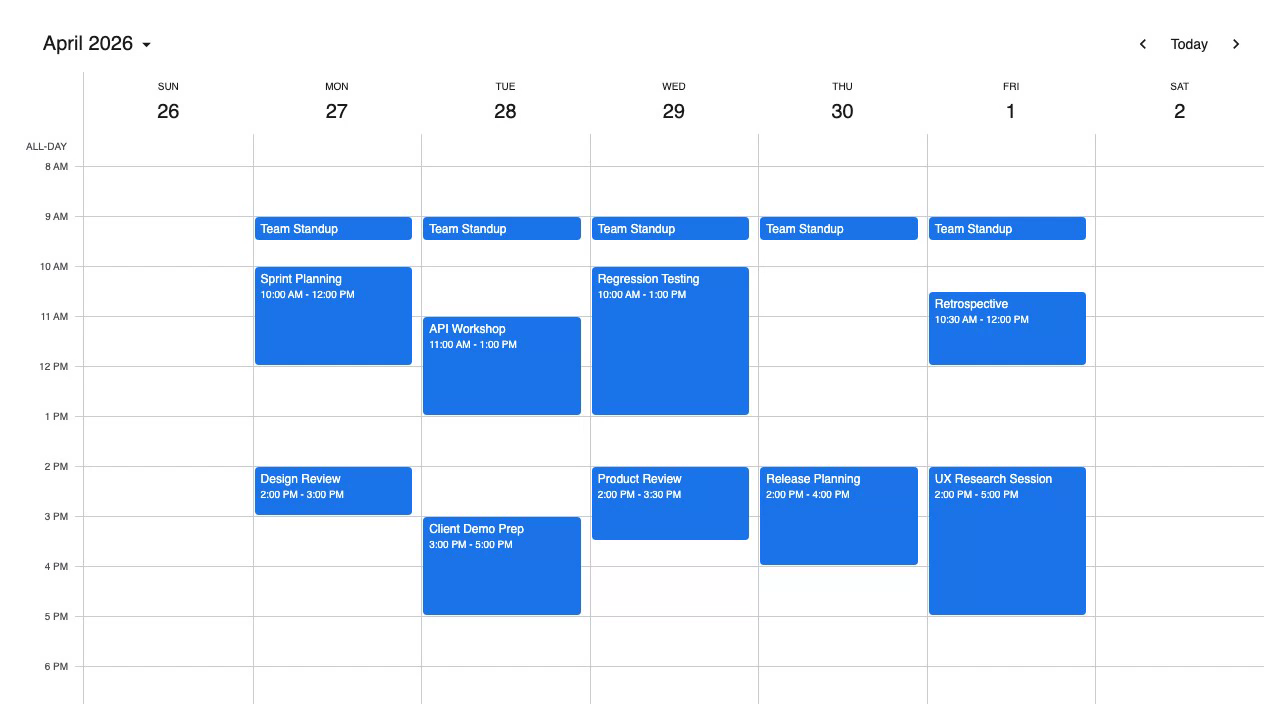
Mobiscroll is best when scheduling interactions must ship together
The timeline view, drag-and-drop, drag-to-create, and resize ship in the same package as the time-grid scheduler, calendar, and agenda views. Switching between view types requires only a view config change. Resource scheduling does not require a separate purchase or add-on.
Framework wrappers are available for React, Angular, Vue, jQuery, and Ionic. The view.timeline.type property accepts 'day', 'week', 'month', or 'year' for short-range and long-range scheduling views.
Compared with Schedule-X, Mobiscroll is the better fit when resource scheduling, drag-and-drop, and resize are required in the first release. Schedule-X starts cheaper for the free core, but its scheduling workflow features move the project into Premium.
Mobiscroll Event Calendar tradeoffs
Event dependencies are not supported, and the library has no undo/redo stack or Excel export. The print module is an add-on available at higher tiers.
The install process requires CLI authentication with the Mobiscroll private registry. Every developer and CI/CD environment must authenticate before running npm install. This adds friction at onboarding and in automated pipelines.
Compared with Schedule-X, Mobiscroll has the higher entry price but includes the core scheduling interactions in one internal-project purchase. Schedule-X has a lower free entry point, but Premium pricing needs a project and developer count before the comparison is fair.
Mobiscroll Event Calendar cost
Mobiscroll uses a per-project perpetual licensing model for internal applications:
- Scheduling & Calendaring: $995 (includes Event Calendar, single internal project)
- Complete: $1,955 (includes source code and priority support)
- Complete Company: $8,955 (multiple internal projects within one organization)
SaaS and multi-customer product licensing uses a subscription model with custom pricing based on customer count. Mobiscroll offers a 90-day trial and a 30-day money-back guarantee on purchases.
Mobiscroll Event Calendar developer experience
TypeScript definitions ship with the package. Documentation at mobiscroll.com covers all four view types with live examples.
Events use the data property (not events), and each event's resource field is resource, not resourceId. Teams migrating from FullCalendar or Schedule-X often miss these naming differences. Theme switching uses mobiscroll.setOptions({ themeVariant: 'dark' }), which applies globally without managing <link> tags.
Mobiscroll Event Calendar AI support
Mobiscroll ships no MCP server, no Claude Code skill, and no built-in AI assistant.
The private registry install process is the main friction point for AI agents. An agent following the standard npm install pattern generates npm install @mobiscroll/javascript, which fails without authentication. The data and resource property names also diverge from the conventions used by FullCalendar and Schedule-X.
Use Mobiscroll when one purchase should cover scheduling interactions
Mobiscroll Event Calendar fits applications that need resource scheduling, drag-and-drop, and resize in a single $995 purchase, and the team can accommodate the CLI authentication step across all development environments and CI/CD pipelines.
Schedule-X
Schedule-X is an open-source JavaScript calendar library with an MIT-licensed core. The free core includes six views:
- Day
- Week
- Month grid
- Month agenda
- Week agenda
- List
The library is built on Preact and ships first-party framework integrations for React, Angular, Vue, and Svelte. Resource scheduling, drag-and-drop, and event resize are paid Premium add-ons.
Installing Schedule-X
The core package and default theme are on the public npm registry. No authentication is required. Schedule-X v4 uses the Temporal API for configuration dates, so the polyfill is a required peer dependency:
npm install @schedule-x/calendar@4.5.0 @schedule-x/theme-default@4.5.0 temporal-polyfill@0.3.2
The following shows a team calendar week view with events spanning April 27 to May 1:
<!-- index.html -->
<style>
  html, body { margin: 0; height: 100%; }
  #calendar-container { width: 100%; height: calc(100vh - 32px); }
</style>
<div id="calendar-container"></div>
import 'temporal-polyfill/global';
import {
  createCalendar,
  createViewDay,
  createViewWeek,
  createViewMonthGrid,
  createViewMonthAgenda
} from '@schedule-x/calendar';
import '@schedule-x/theme-default/dist/index.css';

const calendar = createCalendar({
  views        : [createViewWeek(), createViewDay(), createViewMonthGrid(), createViewMonthAgenda()],
  defaultView  : 'week',
  selectedDate : Temporal.PlainDate.from('2026-04-28'),
  weekOptions  : { gridHeight : 700, scrollToHour : 8 },

  events : [
    { id : '1',  title : 'Team Standup',       start : '2026-04-27 09:00', end : '2026-04-27 09:30' },
    { id : '2',  title : 'Sprint Planning',     start : '2026-04-27 10:00', end : '2026-04-27 12:00' },
    { id : '3',  title : 'Design Review',       start : '2026-04-27 14:00', end : '2026-04-27 15:00' },
    { id : '4',  title : 'Team Standup',        start : '2026-04-28 09:00', end : '2026-04-28 09:30' },
    { id : '5',  title : 'API Workshop',        start : '2026-04-28 11:00', end : '2026-04-28 13:00' },
    { id : '6',  title : 'Client Demo Prep',    start : '2026-04-28 15:00', end : '2026-04-28 17:00' },
    { id : '7',  title : 'Team Standup',        start : '2026-04-29 09:00', end : '2026-04-29 09:30' },
    { id : '8',  title : 'Regression Testing',  start : '2026-04-29 10:00', end : '2026-04-29 13:00' },
    { id : '9',  title : 'Product Review',      start : '2026-04-29 14:00', end : '2026-04-29 15:30' },
    { id : '10', title : 'Team Standup',        start : '2026-04-30 09:00', end : '2026-04-30 09:30' },
    { id : '11', title : 'Release Planning',    start : '2026-04-30 14:00', end : '2026-04-30 16:00' },
    { id : '12', title : 'Team Standup',        start : '2026-05-01 09:00', end : '2026-05-01 09:30' },
    { id : '13', title : 'Retrospective',       start : '2026-05-01 10:30', end : '2026-05-01 12:00' },
    { id : '14', title : 'UX Research Session', start : '2026-05-01 14:00', end : '2026-05-01 17:00' }
  ]
});

calendar.render(document.getElementById('calendar-container'));
Three setup details require attention:
- The
temporal-polyfill/globalimport must come before any call toTemporal.*. Omitting it produces a runtime error. - The
selectedDateproperty accepts aTemporal.PlainDateobject, not a plain string. - Event
startandenduse'YYYY-MM-DD HH:mm'strings for timed events.
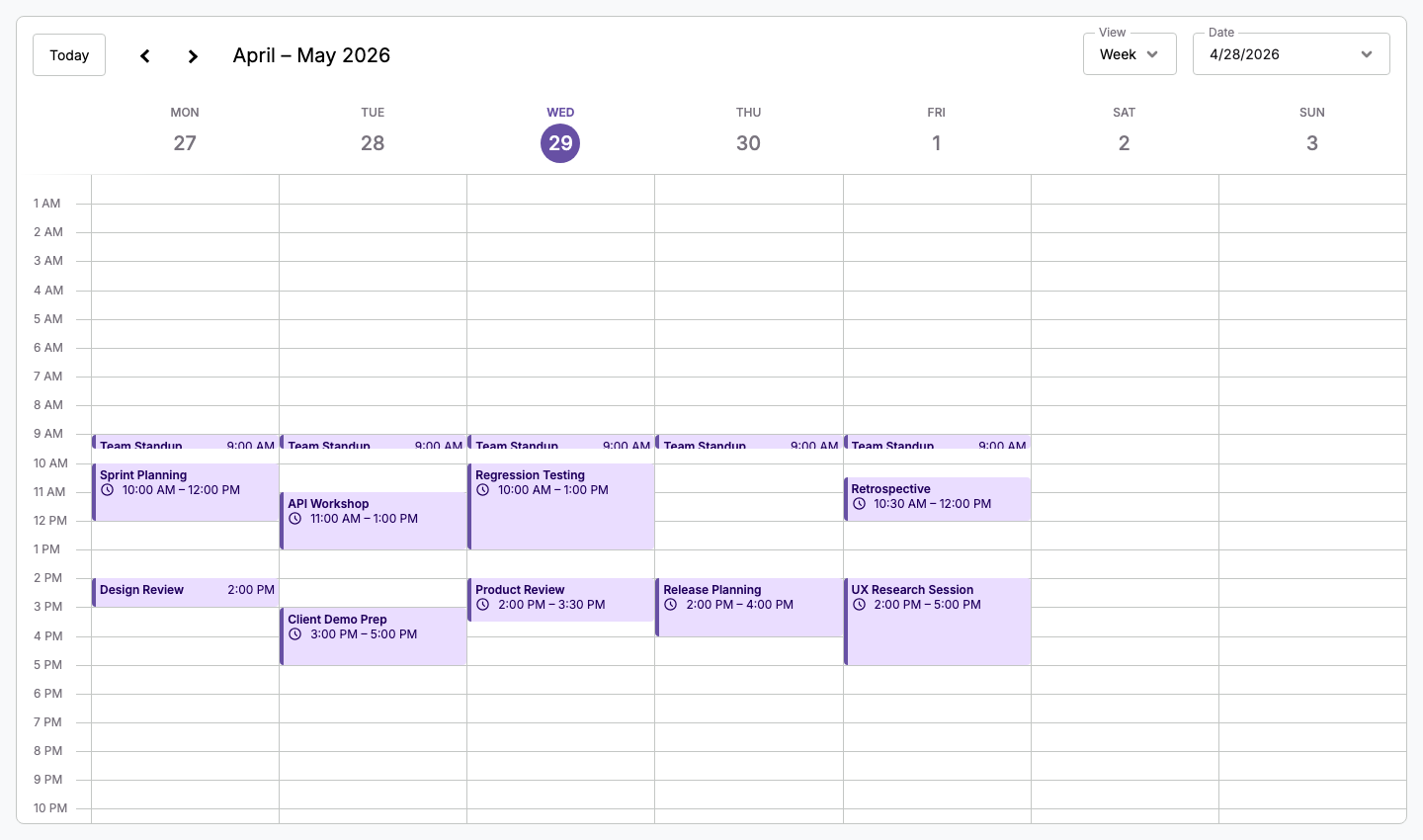
Schedule-X is best when public npm and an MIT core matter most
The MIT-licensed core carries no evaluation watermark, no per-developer fee, and no restriction on open-source use. Installation uses the public npm registry, with no CLI authentication or private registry configuration required.
Premium licensing is per project. The published €299 yearly and €599 lifetime prices apply to one developer, and larger teams should confirm the seat cost before comparing it with Mobiscroll's project pricing.
Compared with Mobiscroll, Schedule-X is the better fit when public npm installation and an MIT-licensed core matter more than bundled scheduling interactions. Mobiscroll is better when the team wants resource scheduling and interactive editing without separate Premium packages.
Schedule-X tradeoffs
Drag-and-drop, event resize, and resource scheduling are premium in v4, having moved from the free tier in v3. Teams upgrading from v3 encounter this break unexpectedly.
The free core has no Excel export, no PDF export, no ICS export, and no undo/redo. The Temporal API peer dependency adds a polyfill requirement that other libraries do not have.
Schedule-X ships no MCP server, no Claude Code skill, and no AI tooling.
Compared with Mobiscroll, Schedule-X starts lower because the core is free and Premium begins at €299 per year for one developer. Mobiscroll costs more upfront, but its $995 internal-project license includes the Event Calendar scheduling features without separate Premium plugins.
Schedule-X cost
The MIT-licensed core is free with no per-developer fee, no watermark, and no evaluation restrictions. Premium add-ons are purchased per project:
- Yearly: from €299 per year for one developer
- Lifetime: from €599 one-time for one developer (includes one year of updates)
- Enterprise: custom quote
Premium includes all Premium packages for the licensed project.
Schedule-X developer experience
TypeScript definitions ship with every @schedule-x/* package. The library is written in TypeScript. Documentation at schedule-x.dev covers all free and premium plugins.
The calendar wrapper element must have an explicit height set via CSS. Dark mode switches via calendar.setTheme('dark') or the isDark: true config property.
Framework wrappers are available for React, Angular, Vue, and Svelte. Each has a dedicated adapter package.
Schedule-X AI support
Schedule-X ships no MCP server, no Claude Code skill, and no built-in AI assistant.
The Temporal polyfill and v4 API changes are the main friction points for AI agents. An agent working from training data is likely to omit the polyfill import, use plain date strings for selectedDate, or import @schedule-x/drag-and-drop which no longer exists as a free package in v4.
Use Schedule-X when paid scheduling features can wait
Schedule-X fits applications that need a calendar with an MIT-licensed core on the public npm registry, the team is comfortable with the Temporal API, and resource scheduling and drag-and-drop can be added as premium features later. Teams should price Premium by project and developer count before choosing it for paid features.
Which one to pick
Mobiscroll Event Calendar is the right choice when the application needs resource scheduling, drag-and-drop, and event resize in a single purchase, and the team can handle CLI authentication for package installation. The $995 per-project price covers all view types and interaction features without separate Premium add-ons.
Schedule-X is the right choice when the application starts with standard calendar views under an MIT license, installs must work without CLI authentication, and drag-and-drop or resource scheduling can be added as premium features later. The Premium price starts at €299 per year or €599 lifetime for one developer, and the public npm registry eliminates the Mobiscroll authentication overhead.
Neither library ships AI tooling. Teams using AI coding agents should plan to provide current documentation in both cases, particularly for the Temporal API in Schedule-X and the data/resource property naming in Mobiscroll.
Bryntum Calendar
Bryntum Calendar is the stronger commercial choice when your application needs resource scheduling and drag-and-drop without Mobiscroll CLI authentication or a Schedule-X Premium add-on. It includes those features in a single commercial package across React, Angular, Vue, and plain JavaScript.
Bryntum publishes per-developer pricing and provides a free Calendar trial download. Trial packages and framework wrappers are available on the public npm registry, and the Bryntum Calendar npm repository guide explains licensed package access.