Bryntum Scheduler vs Mobiscroll Event Calendar

If you're choosing between Bryntum Scheduler and Mobiscroll Event Calendar, you're deciding whether your application needs a dedicated resource scheduler or a calendar package with a timeline view. Both products support resource timelines, drag-and-drop editing, and multiple frameworks. Bryntum Scheduler adds event dependencies, Excel export, undo/redo, and AI support.
Start with these questions:
- Is the timeline view the main scheduling interface?
- Does the application need event dependencies, undo and redo, or Excel export?
- Does the project target jQuery or Ionic as well as React, Angular, or Vue?
This comparison uses these criteria:
- Installation and setup
- Licensing and cost
- Resource scheduling features
- Export support
- Framework and TypeScript support
- AI support
Bryntum Scheduler vs Mobiscroll: scheduling depth and feature comparison
The table below covers the criteria most relevant to a production integration decision.
| Feature | Bryntum Scheduler | Mobiscroll Event Calendar |
|---|---|---|
| License | Commercial | Commercial (perpetual internal / SaaS subscription) |
| Free tier | Trial only | 90-day trial; Lite excludes Event Calendar |
| Timeline / resource view | ✔️ (default) | ✔️ (timeline view) |
| Day / Week / Month views | ✔️ | ✔️ |
| Resource management | ✔️ | ✔️ |
| Event dependencies | ✔️ | ❌ |
| Undo / redo | ✔️ | ❌ |
| Multiple instances per page | ✔️ | ✔️ |
| Export to PDF / Excel | ✔️ (client-side) | Print add-on; no Excel |
| React / Angular / Vue wrappers | ✔️ | ✔️ (+ jQuery, Ionic) |
| TypeScript | ✔️ | ✔️ |
| MCP server | ✔️ | ❌ |
| Claude Code skill | ✔️ | ❌ |
| Built-in AI assistant | Experimental feature | ❌ |
Bryntum Scheduler
Bryntum Scheduler is a commercial JavaScript component for building resource scheduling interfaces. Its default view is a horizontal timeline: resources (people, machines, rooms) appear as rows, and events are draggable bars across a configurable time axis. The component is built on Bryntum Grid, so the resource panel inherits full sorting, filtering, grouping, and column configuration without extra setup.
Installing Bryntum Scheduler
The trial package is available on the public npm registry without authentication:
npm install @bryntum/scheduler@npm:@bryntum/scheduler-trial@7.2.4
The following is a minimal resource scheduler showing four team members across a two-week sprint. The container fills the viewport height via CSS:
<!-- index.html -->
<style>
  html, body { margin: 0; height: 100%; }
  #container { height: 100vh; }
</style>
<div id="container"></div>
import '@bryntum/scheduler/fontawesome/css/fontawesome.css';
import '@bryntum/scheduler/fontawesome/css/solid.css';
import '@bryntum/scheduler/scheduler.css';
import '@bryntum/scheduler/svalbard-light.css';
import { Scheduler } from '@bryntum/scheduler';

new Scheduler({
  appendTo  : 'container',
  startDate : '2025-05-07',
  endDate   : '2025-05-26',
  viewPreset : 'weekAndDay',

  columns : [{ text : 'Team member', field : 'name', width : 160 }],

  resources : [
    { id : 1,  name : 'Celia',          title : 'Sales' },
    { id : 11, name : 'Fancy law firm', eventColor : 'teal' },
    { id : 12, name : 'Small boutique', eventColor : 'blue' },
    { id : 13, name : 'Grocery store',  eventColor : 'lime' }
  ],

  events : [
    { id : 1, resourceId : 1,  name : 'Busy',              startDate : '2025-05-07', endDate : '2025-05-09', eventColor : 'red' },
    { id : 2, resourceId : 11, name : 'Meeting',           startDate : '2025-05-07', endDate : '2025-05-09', location : 'clients office' },
    { id : 3, resourceId : 12, name : 'Phone',             startDate : '2025-05-07', endDate : '2025-05-08', location : 'office' },
    { id : 4, resourceId : 13, name : 'Suggested meeting', startDate : '2025-05-09', endDate : '2025-05-11', location : 'grocery store' }
  ]
});
Three CSS imports are required in order: FontAwesome icons, the structural scheduler.css, and a theme file. Bryntum ships ten themes across five light/dark pairs, all switchable at runtime via DomHelper.setTheme().
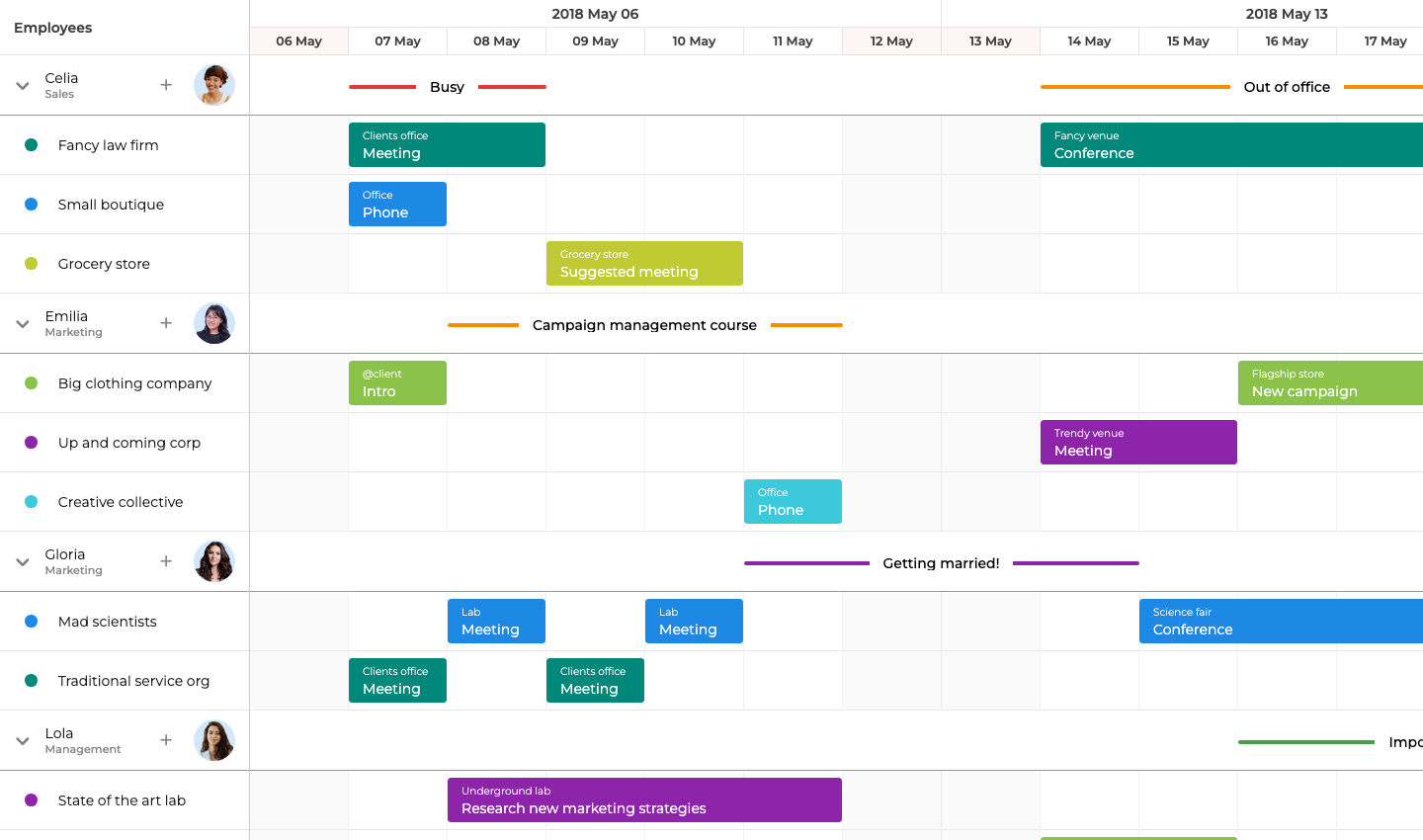
Timeline view, event dependencies, and client-side export in the base license
The timeline view is the default. The base license includes:
- Event dependencies (finish-to-start, start-to-start, and others)
- Resource grouping
- Capacity summaries
- Undo/redo
Zooming works from milliseconds to years with up to three configurable header rows, and virtual rendering keeps large datasets fast without pagination.
Export to PDF, PNG, and Excel runs client-side with no server dependency. The theming system is consistent across the Bryntum product suite (Gantt, Calendar, Grid, and Task Board), so visual consistency comes for free if the application uses more than one component.
Bryntum Scheduler: bundle size, trial watermark, and store separation
The trial watermark persists during evaluation, which complicates early stakeholder demos. The API surface is large: Scheduler, ResourceStore, EventStore, and AssignmentStore are separate objects with distinct responsibilities. The uncompressed bundle exceeds 4 MB, which is a meaningful consideration for applications where initial load time is critical.
Bryntum Scheduler pricing: perpetual license from $680 per developer
Per-developer licensing starts at $680 for a small team (minimum three developers, $2,040 entry). A perpetual license includes 12 months of updates. OEM licensing for SaaS applications requires a separate quote.
TypeScript, EventStore vs AssignmentStore, and framework wrappers
TypeScript type definitions ship with the package, covering the full Scheduler, ResourceStore, EventStore, and AssignmentStore API. Documentation at bryntum.com includes live code examples with an in-browser editor.
Framework wrappers for React (@bryntum/scheduler-react), Angular, and Vue 3 are published on the same version cycle as the core.
For runtime theme switching, load theme files with <link> tags marked for Bryntum theme detection and call DomHelper.setTheme().
Coding agent support: MCP server, Claude Code skill, and AI assistant
Bryntum ships two complementary AI tools: the MCP server handles documentation retrieval, and the Claude Code skill adds judgment about common coding mistakes.
The MCP server (mcp.bryntum.com) exposes a search_bryntum_docs tool that returns version-specific documentation, source code examples, and API references for Scheduler, Gantt, Calendar, Grid, Task Board, and Scheduler Pro. The command to register it in Claude Code:
claude mcp add --transport http bryntum https://mcp.bryntum.com
The Claude Code skill guides agents through the mistakes that documentation retrieval alone misses: CSS import order, the difference between EventStore and AssignmentStore, and the correct dark mode pattern via DomHelper.setTheme(). An agent with both the MCP server and the skill produces working Bryntum code with fewer correction cycles.
Bryntum also ships an experimental, disabled-by-default AI chat panel for Scheduler that connects to Anthropic, OpenAI, or Google models. End users give natural language instructions such as "move all of Alice's tasks to next week" without touching the interface directly.
Use Bryntum Scheduler when scheduling depth matters
Bryntum Scheduler is the right call when a timeline view for resource allocation is the core requirement. The scheduling features, AI tooling, and client-side export pipeline make it a better fit for teams building complex planning tools or using AI coding agents.
Mobiscroll Event Calendar
Mobiscroll Event Calendar is a commercial JavaScript calendar component that includes a timeline view for resource scheduling. The timeline view maps resources to rows and time to columns, with color-coded event bars across the date axis. Resources carry an optional color property that applies to their events.
Bryntum Scheduler handles scheduling depth inside the product, including dependencies, export, undo/redo, and AI agent support, while Mobiscroll fits teams that need a calendar package with a timeline view across jQuery, Ionic, React, Angular, and Vue.
The Event Calendar is not available on the public npm registry. It requires authentication via the Mobiscroll CLI.
Installing Mobiscroll Event Calendar
Two commands set up Mobiscroll access: the global CLI install and a per-project config step.
npm install -g @mobiscroll/cli
mobiscroll config javascript
The mobiscroll config javascript command opens a browser to authenticate with Mobiscroll and configures npm to use the Mobiscroll private registry. Follow the CLI prompts to install the package. A trial account is sufficient for evaluation.
The following shows a resource timeline for four team members across April 2026:
<!-- index.html -->
<style>
  html, body { margin: 0; padding: 0; height: 100%; font-family: Arial, sans-serif; }
  #app { padding: 16px; height: 100vh; box-sizing: border-box; }
  #calendar { height: calc(100vh - 32px); }
</style>
<div id="app">
  <div id="calendar"></div>
</div>
import * as mobiscroll from '@mobiscroll/javascript';
import '@mobiscroll/javascript/dist/css/mobiscroll.min.css';

mobiscroll.setOptions({ theme: 'material', themeVariant: 'light' });

mobiscroll.eventcalendar('#calendar', {
  view : {
    timeline : { type : 'month' }
  },
  selectedDate : new Date(2026, 3, 1).getTime(),
  dragToCreate : true,
  dragToMove   : true,
  dragToResize : true,
  resources : [
    { id : 1, name : 'Alice (Frontend)', color : '#4f46e5' },
    { id : 2, name : 'Bob (Backend)',    color : '#0ea5e9' },
    { id : 3, name : 'Carol (Design)',   color : '#10b981' },
    { id : 4, name : 'Dave (QA)',        color : '#f59e0b' }
  ],
  data : [
    { id : '1', resource : 1, title : 'UI Component Library', start : new Date(2026, 3, 6),  end : new Date(2026, 3, 11) },
    { id : '2', resource : 2, title : 'REST API Development', start : new Date(2026, 3, 6),  end : new Date(2026, 3, 11) },
    { id : '3', resource : 3, title : 'Wireframes v2',        start : new Date(2026, 3, 6),  end : new Date(2026, 3, 9)  },
    { id : '4', resource : 4, title : 'Regression Suite',     start : new Date(2026, 3, 6),  end : new Date(2026, 3, 8)  },
    { id : '5', resource : 1, title : 'Code Review',          start : new Date(2026, 3, 14), end : new Date(2026, 3, 17) },
    { id : '6', resource : 2, title : 'Database Migration',   start : new Date(2026, 3, 13), end : new Date(2026, 3, 17) },
    { id : '7', resource : 3, title : 'Component Specs',      start : new Date(2026, 3, 9),  end : new Date(2026, 3, 14) },
    { id : '8', resource : 4, title : 'Performance Tests',    start : new Date(2026, 3, 8),  end : new Date(2026, 3, 12) }
  ]
});
Four setup details require attention:
- The examples use a timestamp for
selectedDate; calling.getTime()avoids string parsing and timezone ambiguity. - Events use the
dataproperty, notevents. - The resource field on each event is
resource, notresourceId. - The
view.timeline.typeproperty sets the visible range. A month timeline renders daily columns across the selected month, which is suitable for multi-day tasks.
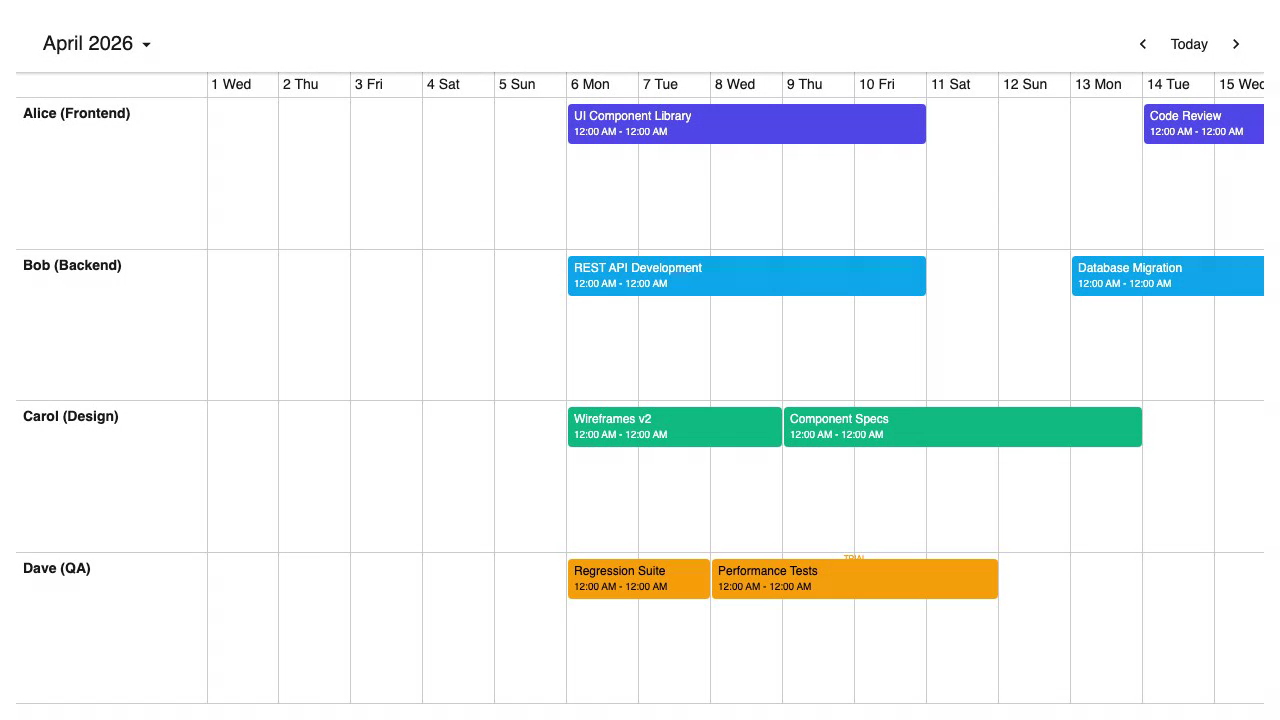
Timeline, scheduler, calendar, and agenda in one package with jQuery and Ionic support
The timeline view ships in the same package as the time-grid scheduler, calendar, and agenda views, so switching between view types requires only a view config change. Drag-and-drop for creating, moving, and resizing events is included.
Framework wrappers are available for React, Angular, Vue, jQuery, and Ionic.
The timeline view handles large resource lists with virtual rendering, and the color property on resources applies automatically to their events without extra CSS.
No event dependencies, no Excel export, no undo/redo, and private registry
Event dependencies are not supported, and the library has no undo/redo stack or built-in export to Excel or ICS. Mobiscroll provides print-optimized styling and a print method through its print module, which is included in higher tiers and available as an add-on for the Scheduling & Calendaring license.
The install process requires CLI authentication and does not use the public npm registry. This adds friction to CI/CD pipelines and onboarding across development teams.
Mobiscroll pricing: $995 per project for internal apps
Mobiscroll uses a per-project perpetual licensing model for internal applications:
- Scheduling & Calendaring: $995 (includes Event Calendar, single internal project)
- Complete: $1,955 (includes source code and priority support)
- Complete Company: $8,955 (multiple internal projects within one organization)
SaaS and multi-customer product licensing uses a subscription model with custom pricing based on customer count. Mobiscroll offers a 90-day trial and a 30-day money-back guarantee on purchases.
data vs events, resource vs resourceId, and global theme options
TypeScript type definitions ship with the package. Documentation at mobiscroll.com covers all four view types.
Events use the data property (not events), and each event's resource field is resource, not resourceId. These naming differences are easy to miss when migrating from another library. Theme switching uses mobiscroll.setOptions({ themeVariant: 'dark' }), which applies globally without managing <link> tags.
Framework wrappers are available for React, Angular, Vue, jQuery, and Ionic.
No AI tooling: private registry install and naming differences trip up agents
Mobiscroll ships no MCP server, Claude Code skill, or structured documentation retrieval for AI agents.
The private registry install process is the main friction point for AI agents. An agent following the standard npm install pattern generates npm install @mobiscroll/javascript, which fails without authentication. The property name differences (data instead of events, resource instead of resourceId) are also easy to miss without current documentation. Without a skill encoding these constraints, agents produce code that fails at install or at runtime.
Use Mobiscroll when a timeline plus calendar package is enough
Mobiscroll Event Calendar includes a timeline view with resource management and drag-and-drop. The first question to answer is whether event dependencies, undo/redo, or Excel/ICS export are requirements. If they are, those features need custom implementation. The CLI-based install process repeats for each new development environment and CI/CD pipeline, so plan for it early.
Which is better: Bryntum Scheduler or Mobiscroll?
For most production resource scheduling applications, Bryntum Scheduler is the right choice. The following features are included by default:
- Timeline view
- Event dependencies
- PDF, PNG, and Excel export
- Undo/redo
The perpetual license model avoids recurring per-developer costs. The MCP server and Claude Code skill make it easier to support in teams using AI coding agents.
Bryntum Scheduler is the better default when scheduling depth matters, while Mobiscroll Event Calendar is reasonable when the application needs a timeline view alongside calendar and agenda views in a single package, and event dependencies, undo/redo, and Excel/ICS export are not requirements. The $995 per-project price point is competitive for small internal applications. The CLI authentication process repeats for each new development environment and CI/CD pipeline, so plan for it across the team.